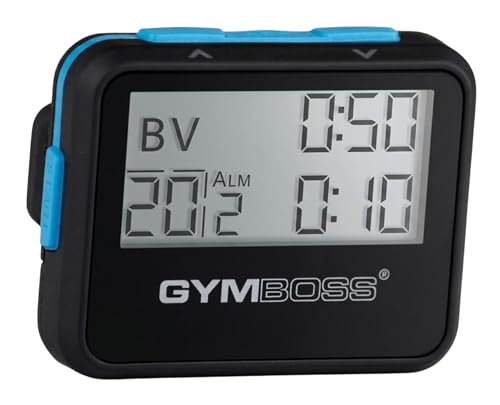
A gym timer is best for focused, interference-free interval training, especially in gyms with strict phone policies. A phone timer is more versatile, portable, and affordable, suitable for most home workouts and casual gym use.
When you walk into a gym or set up for a home workout, one small decision can affect your entire session: what to use for timing. Should you rely on a dedicated gym timer or simply pull out your phone? Both have their strengths, and the right choice depends on your training style, environment, and priorities. Let’s break down the key differences so you can make a practical choice that keeps your workouts efficient and focused.
Why Use a Gym Timer?
A gym timer, often a large digital clock with countdown and interval functions, is a staple in many commercial gyms. Its primary advantage is visibility: you can see it from across the room without squinting or stopping your movement. This is crucial for exercises like deadlifts or sprints where you need to maintain focus on form, not your wrist or pocket.
Gym timers are also distraction-free. They don’t buzz with notifications from messages or apps, and they don’t tempt you to scroll between sets. If you struggle with phone addiction during rest periods, a gym timer can help you stick to your rest intervals. Many models also have loud beeps or alarms that cut through gym noise, ensuring you hear the end of a round.
On the downside, gym timers are stationary. If you move around the gym frequently or train outdoors, you won’t have consistent access. They also require a power source and sometimes a setup process, which can be a hassle in busy gyms where someone else might change your settings.
Why Use a Phone Timer?
Your smartphone is the most versatile timer you already carry. With a built-in clock app and countless third-party interval timers, you can set up complex workout structures in seconds. Features like vibrating alerts, customizable intervals, and integration with music or workout apps make the phone a powerful timing tool.
Portability is a major advantage. You can take your timer anywhere including outdoor tracks, hotel gyms, or living rooms. For home workouts, a phone timer is the default since you don’t need to buy extra equipment. Additionally, many fitness apps automatically track time under different exercise modes, giving you data on total workout duration and rest periods.
However, phones come with distractions. A notification can break your concentration, and handling the phone between sets can slow down your pace. Battery life is another concern; a long workout can drain your phone, especially if you’re also streaming music. Some gyms also have strict no-phone policies for safety or etiquette reasons, forcing you to go without.
Key Differences in Functionality and User Experience
The core difference lies in accessibility versus immersion. A gym timer is a shared, always-on display that lets you and others monitor time without handling a device. It excels in high-intensity interval training (HIIT) where every second counts and you need to see the countdown without interruption. Phone timers, meanwhile, offer personalization. You can set different timers for different exercises, use voice control, or even have your watch vibrate to keep your hands free.
Accuracy is comparable; both can measure seconds reliably. But latency can differ: some gym timers have a slight delay in button response, while phone timer apps might have a one-second lag when starting countdowns. For most workouts, this is negligible. Sound quality matters: gym timers often have louder alarms suited for noisy environments, while phone speakers can be too quiet if placed in a pocket or bag.
Setup time varies. Phone timers take a few taps, while gym timers may require scrolling through menus to set intervals. In a group setting, a gym timer is easier for a coach to manage for everyone. For solo training, your phone is quicker to configure.
Which One Should You Choose for Your Workouts?
Your choice should depend on your environment and goals. If you train in a commercial gym with a visible timer, and you want to minimize distractions, use the gym timer for main sets and your phone for the warm-up or cool-down. For home or outdoor workouts, a phone timer is the most practical and cost-effective option. If you find yourself checking social media between sets, consider a dedicated gym timer to enforce discipline.
For interval training like Tabata or EMOM (every minute on the minute), a gym timer’s large display helps you stay on pace. Strength trainers often prefer phone timers with customizable rest periods. For long endurance sessions, either works, but a phone can also play audiobooks or podcasts, making time pass faster.
Ultimately, you can also combine both. Use a gym timer for the main workout and keep your phone in airplane mode with a timer running for specific warm-up drills. Experiment with both for a week and stick with what keeps you moving without frustration.
Practical Tips for Using Either Timer Effectively
If you choose a gym timer, learn its interface before your workout. Know how to set a countdown, change intervals, and silence the alarm. During peak hours, be respectful of others and don’t hog the timer; if you need complex intervals, consider using your phone instead to avoid tying up the shared display.
With a phone timer, minimize distractions by enabling Do Not Disturb or using a dedicated timer app that blocks notifications. Set your phone face down or in a pocket to avoid peeking. For intervals, use a smartwatch or fitness band for wrist-based vibration alerts, which are subtle and keep your hands free. Always carry a backup charger if your workouts are long, and consider a waterproof case if you sweat heavily.
No matter which you use, practice setting it up quickly. A 10-second delay between sets adds up over a 30-minute workout. The best timer is the one you actually use consistently, so choose based on what helps you train hard without overthinking.
Frequently asked questions
Can I use a gym timer for home workouts?
Yes, but most gym timers are designed for wall mounting and require an outlet. Portable gym timers exist, but they cost more and may be overkill for simple home routines. A phone timer is usually more convenient and free.
Do phone timers drain the battery quickly?
Using the built-in clock app has minimal battery impact, about 1-2% per hour. However, using interval apps with screen-on mode or integrating with music apps can increase drain. Keep your screen brightness low and close unused apps to conserve battery.
Which is better for group training sessions?
A gym timer is better for groups because everyone can see it from their station. A coach can manage timing centrally. Phones can be inconsistent across users and may cause distractions. If phones must be used, have everyone set the same timer and keep them on silent.
Are there any safety concerns with using a phone timer?
The main safety issue is distraction. Checking your phone during sets can lead to dropped weights or tripping. Keep it secured in a pocket or on a stable surface. Also, avoid holding it while performing exercises that require both hands for balance.
Looking to buy? See our Fitness Technology guides for tested picks.